from flask import Flask , render_template, request
app = Flask(__name__)

@app.route('/')
def index():
    return render_template('index.html')

@app.route('/login', methods={'GET', 'POST'})
def login():
    if request.method == "POST":
        user_id = request.form.get('username')
        user_pw = request.form.get('password')

        return render_template('result.html', user_id = user_id, user_pw=user_pw)

    return render_template('login.html')


app.run()
render_template은 웹 서버가 저장해 둔 HTML 문서에 원하는 정보를 채워 넣어서 완정한 웹 페이지로 만든 뒤, 사용자의 브라우저로 보내주는 역할을 한다.
그리고 methods에 GET은 사용자가 값을 서버에 요청하여 조회 하는 방식이고 POST는 사용자가 입력한 내용을 가지고 서버에 요청하여 값을 저장하거나 처리 하는 메서드이다.
위 코드 해석
from flask import Flask , render_template, request
app = Flask(__name__)
flask 라이브러리를 불러오고 render_template을 써서 HTML정보를 불러 올수 있도록 한다.
request라이브러리를 이용하여 methods에 저장한 GET과 POST를 이용할수 있도록 한다.
@app.route('/')
def index():
    return render_template('index.html')
127.0.0.1에 기본 웹을 불러 올때 render_template을 이용해서 index.html을 불러온다.

그러면 이러한 화면이 뜨게 된다 . 그후 로그인 하기를 누르면
@app.route('/login', methods={'GET', 'POST'})
def login():
    if request.method == "POST":
        user_id = request.form.get('username')
        user_pw = request.form.get('password')

        return render_template('result.html', user_id = user_id, user_pw=user_pw)

    return render_template('login.html')
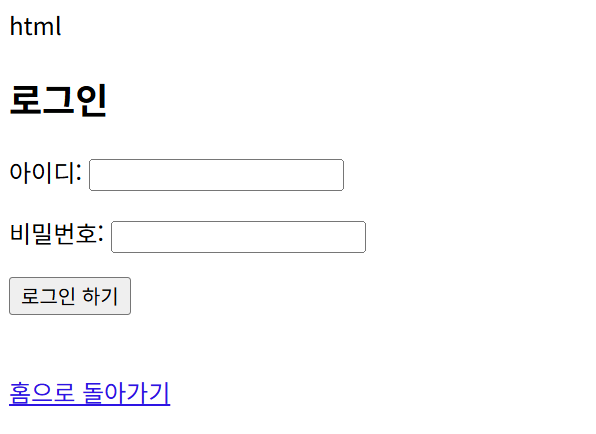
이 부분으로 넘어간다 127.0.0.1/login을 호출 하게 되는데 login 에서 값을 넣으면
html
<!DOCTYPE html>
<html lang="ko">
<head>
    <meta charset="UTF-8">
    <title>로그인 페이지</title>
</head>
<body>
    <h2>로그인</h2>

    <form action="/login" method="post">
        <p>아이디: <input type="text" name="username" required></p>
        <p>비밀번호: <input type="password" name="password" required></p>
        <button type="submit">로그인 하기</button>
    </form>

    <br>
    <a href="/">홈으로 돌아가기</a>
</body>
</html>
그 값을 html로 보내게 되고 그값을 POST한다. 그러면 POST를 하고 result.html을 호출 하고
html
<!DOCTYPE html>
<html lang="ko">
<head>
    <meta charset="UTF-8">
    <title>결과 페이지</title>
</head>
<body>
    <h1>전송 완료!</h1>
    <p>입력하신 아이디: <strong>{{ user_id }}</strong></p>
    <p>입력하신 비밀번호: <strong>{{ user_pw }}</strong></p>
    <hr>
    <a href="/login">다시 로그인하기</a> | <a href="/">홈으로</a>
</body>
</html>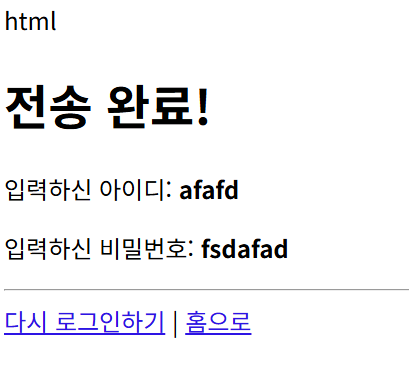
이런식으로 내가 쓴 아이디와 비밀번호를 반환 하여 보여주는 것을 알수 있다.